

Supported formats
- Images — PNG, JPG, GIF
- Videos — uploaded video files
Always add a description
When you attach stimulus, add a clear, human-readable description of what it is. This isn’t just for you — the AI moderator reads the description so it knows what participants are looking at and can reference it naturally in conversation. A description like “Version A of the pricing page — three tiers, free/pro/enterprise, annual pricing shown by default” is much better than “pricing page.” The more context the AI moderator has, the better it can guide the discussion.How it works in a session
When the AI moderator reaches a moment with stimulus, it displays on every participant’s screen automatically. The moderator introduces it using your description and guides the discussion around it.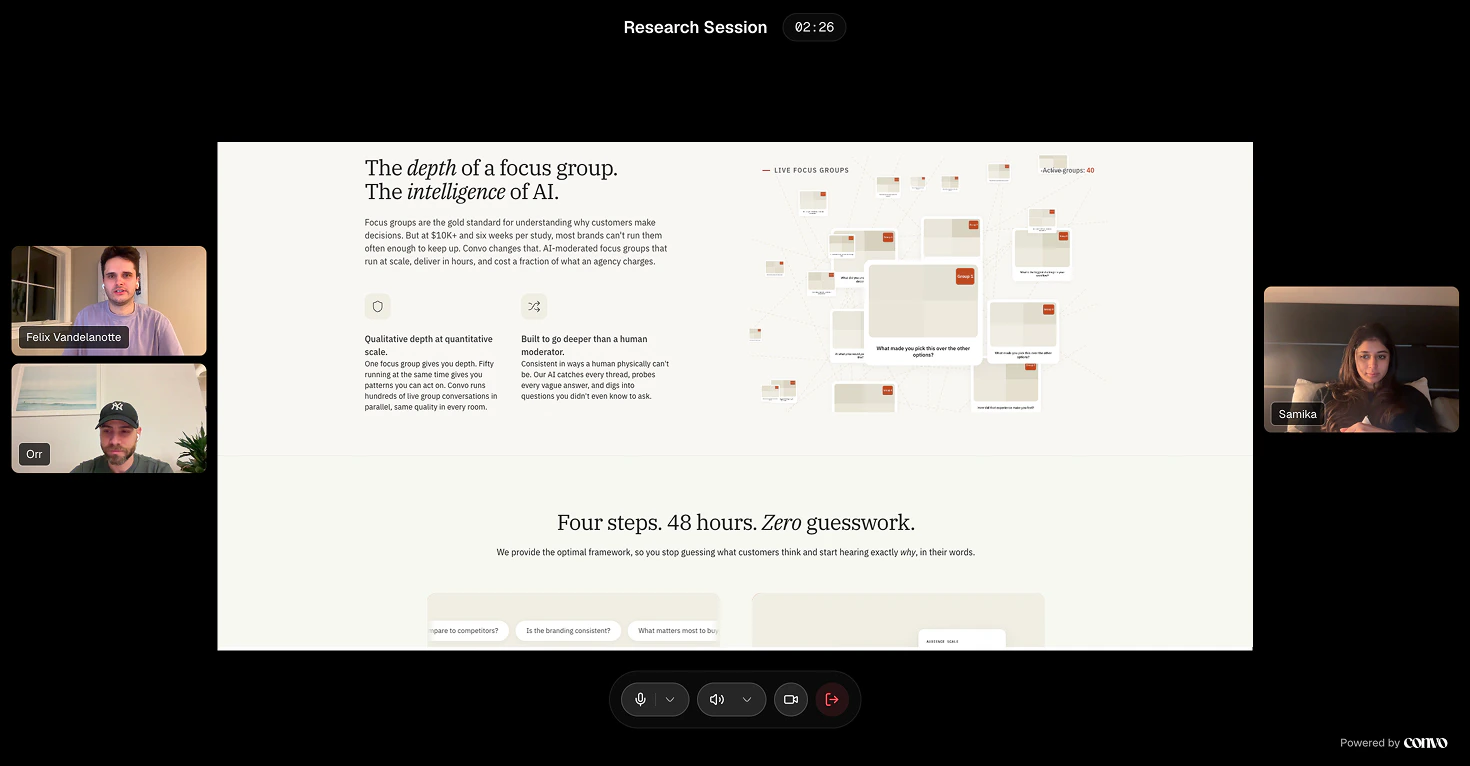
Know the viewport
Stimulus displays in a fixed area in the center of the session screen, with participant video feeds on either side. That means participants only see a portion of your image at a time — roughly what you’d see above the fold on a laptop screen. If you’re testing a full landing page, participants won’t see the entire page at once. You have two options:- Screenshot just the section you care about. If you want feedback on the hero, crop to the hero. If you want feedback on the pricing table, crop to that. This is usually the better approach — it focuses the conversation.
- Break the page into sections across multiple moments. Hero in moment one, features in moment two, pricing in moment three. Each gets its own focused discussion.
When in doubt, crop tighter. A clear, focused stimulus gets better reactions than a zoomed-out one where participants have to squint at details.
What you can test with stimulus
Stimulus works best when you’re showing people something concrete and asking for their reaction. One stimulus per moment — if you need reactions to multiple things, use separate moments.Ad testing
Upload the ad creative (image or video) as stimulus. Create one moment per ad variant. The AI moderator shows each one and asks participants what they notice, how it makes them feel, and whether it would make them take action. If you’re testing multiple versions, use separate moments with clear descriptions like “Ad variant A — lifestyle imagery, emotional headline” and “Ad variant B — product screenshot, feature-focused headline.” The AI moderator can then ask participants to compare them.Concept testing
Show early-stage ideas — sketches, wireframes, mockup screens. Concepts don’t need to look polished. Rough is actually better because participants give more honest feedback when something doesn’t look final. Use one moment per concept. In your moment goal, be specific about what you want to learn: “Understand whether users can tell what this product does from the landing page alone” gives the AI moderator a clear direction.Landing page testing
Screenshot the full page or break it into sections (hero, features, pricing, footer) across multiple moments. This lets you get focused feedback on each part instead of a vague “what do you think of this page?” For comparison testing, show the current page in one moment and the new version in the next. Describe both clearly so the AI moderator can reference the differences.Creative and brand testing
Logos, packaging, brand imagery, social media posts — anything visual. Upload the asset and describe what stage it’s at and what you’re deciding between. Works well for A/B testing: “We’re choosing between two packaging designs for our new product line. I’d like to understand which one communicates premium quality better.”Product and UX testing
Walk participants through a flow by showing one screen per moment. For example, a checkout flow might be four moments: cart → shipping → payment → confirmation. Each moment gets its own screenshot with a goal like “Understand if users can find the discount code field.”What makes good stimulus
Show work-in-progress, not polished finals. Mockups, wireframes, and rough prototypes get better feedback. When something looks finished, participants feel like their feedback won’t matter. One stimulus per moment. Don’t attach three screenshots to one moment. Participants can’t meaningfully react to all of them. Use separate moments for each thing you want a reaction to. Make it big enough to read. If there’s text in your image, make sure it’s legible on a video call. Participants won’t squint — they’ll just say “looks fine.” Use real examples over descriptions. Showing a competitor’s actual pricing page gets better reactions than saying “imagine a pricing page with three tiers.” People react to what they can see. Write a detailed description. The AI moderator uses your description to introduce the stimulus and guide the conversation. “Homepage redesign v2 — simplified nav, hero with product demo video, social proof section moved above the fold” gives it a lot more to work with than “new homepage.”What to avoid
- Stock photos. Participants can tell. They’ll react to the photo feeling generic, not to the concept you’re testing.
- Overly complex screens. If you’re testing a flow, show one step at a time across multiple moments.
- Stimulus without a description. The AI moderator won’t know what it’s looking at and can’t guide the conversation well.
- Stimulus that needs context you haven’t given. If you show a dashboard, make sure your description and moment intro explain what participants are looking at.
- Videos longer than 60 seconds. Participants lose focus. Keep video stimulus short and let the conversation be the main event.